Logging in using the DU PACSonWEB mobile app
If your configured 2FA method is Time-based one-time password from app, please follow these steps:
1. Log in to DeepUnity PACSonWEB with your username and password.
A notification to confirm or deny your login attempt will be displayed on all linked devices on which you have installed the DeepUnity PACSonWEB mobile app.
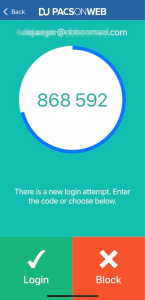
2. Complete your login by tapping Login from the app or enter the code that is displayed in the Time-based one-time password field.
If you have no internet connection on your mobile device or you are using a third-party authenticator app, you must enter the numeric code from the app and click Continue in your browser to complete your login.